> ## Documentation Index
> Fetch the complete documentation index at: https://docs.ctechnology.io/llms.txt
> Use this file to discover all available pages before exploring further.
# Developer introduction
> Getting started with c.technology systems, APIs and development resources.

 Modern vehicles generate enormous amounts of data - from GPS coordinates and engine diagnostics to environmental sensors and user interactions.
The c.technology developer platform abstracts the complexity of vehicle connectivity, data processing, and real-time synchronization, allowing you to focus on creating exceptional user experiences rather than managing infrastructure.
From simple location tracking to sophisticated predictive maintenance algorithms, the platform scales with your needs while maintaining enterprise-grade security and reliability.
The platform is essentially sliced into three layers:
* **Applications**: Web and mobile apps, dashboards, reporting tools, and developer SDKs.
* **Systems**: Storage services, data processing pipelines, API gateways, authentication services, payment processing, and analytics engines.
* **Infrastructure**: Scalable containerized cloud services, (real-time, spatial, etc.) databases, message queues, and IoT connectors.
Modern vehicles generate enormous amounts of data - from GPS coordinates and engine diagnostics to environmental sensors and user interactions.
The c.technology developer platform abstracts the complexity of vehicle connectivity, data processing, and real-time synchronization, allowing you to focus on creating exceptional user experiences rather than managing infrastructure.
From simple location tracking to sophisticated predictive maintenance algorithms, the platform scales with your needs while maintaining enterprise-grade security and reliability.
The platform is essentially sliced into three layers:
* **Applications**: Web and mobile apps, dashboards, reporting tools, and developer SDKs.
* **Systems**: Storage services, data processing pipelines, API gateways, authentication services, payment processing, and analytics engines.
* **Infrastructure**: Scalable containerized cloud services, (real-time, spatial, etc.) databases, message queues, and IoT connectors.
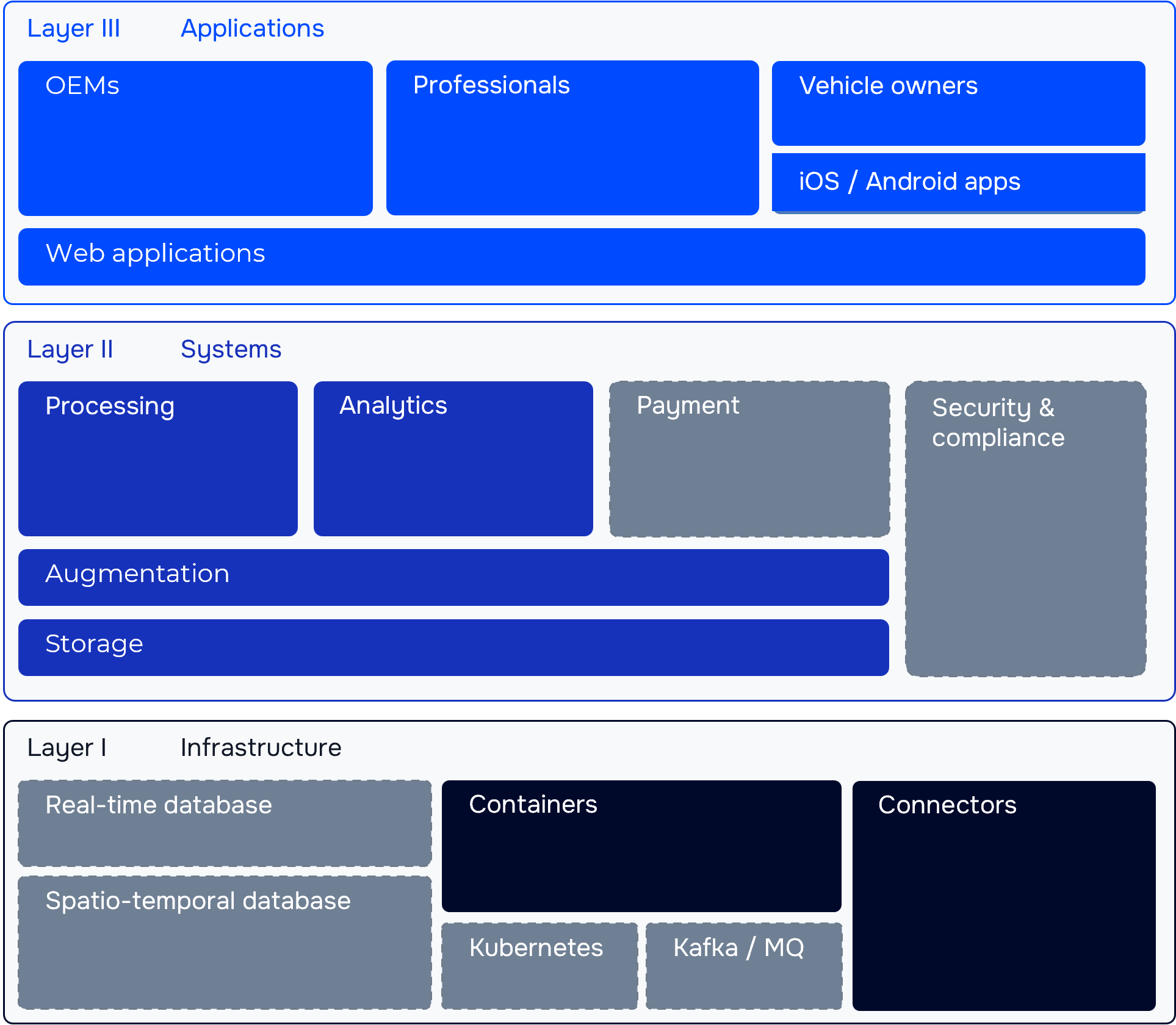 Usually, as a developer, you will interact with the systems layer via APIs, while using the applications layer to manage your account, vehicles, and data.
Commonly, you do not have to concern yourself with the underlying infrastructure, as it is fully managed by us.
## System architecture
The following diagram provides a high-level overview of the c.technology platform architecture, illustrating how different components interact to deliver a seamless vehicle connectivity experience.
Usually, as a developer, you will interact with the systems layer via APIs, while using the applications layer to manage your account, vehicles, and data.
Commonly, you do not have to concern yourself with the underlying infrastructure, as it is fully managed by us.
## System architecture
The following diagram provides a high-level overview of the c.technology platform architecture, illustrating how different components interact to deliver a seamless vehicle connectivity experience.
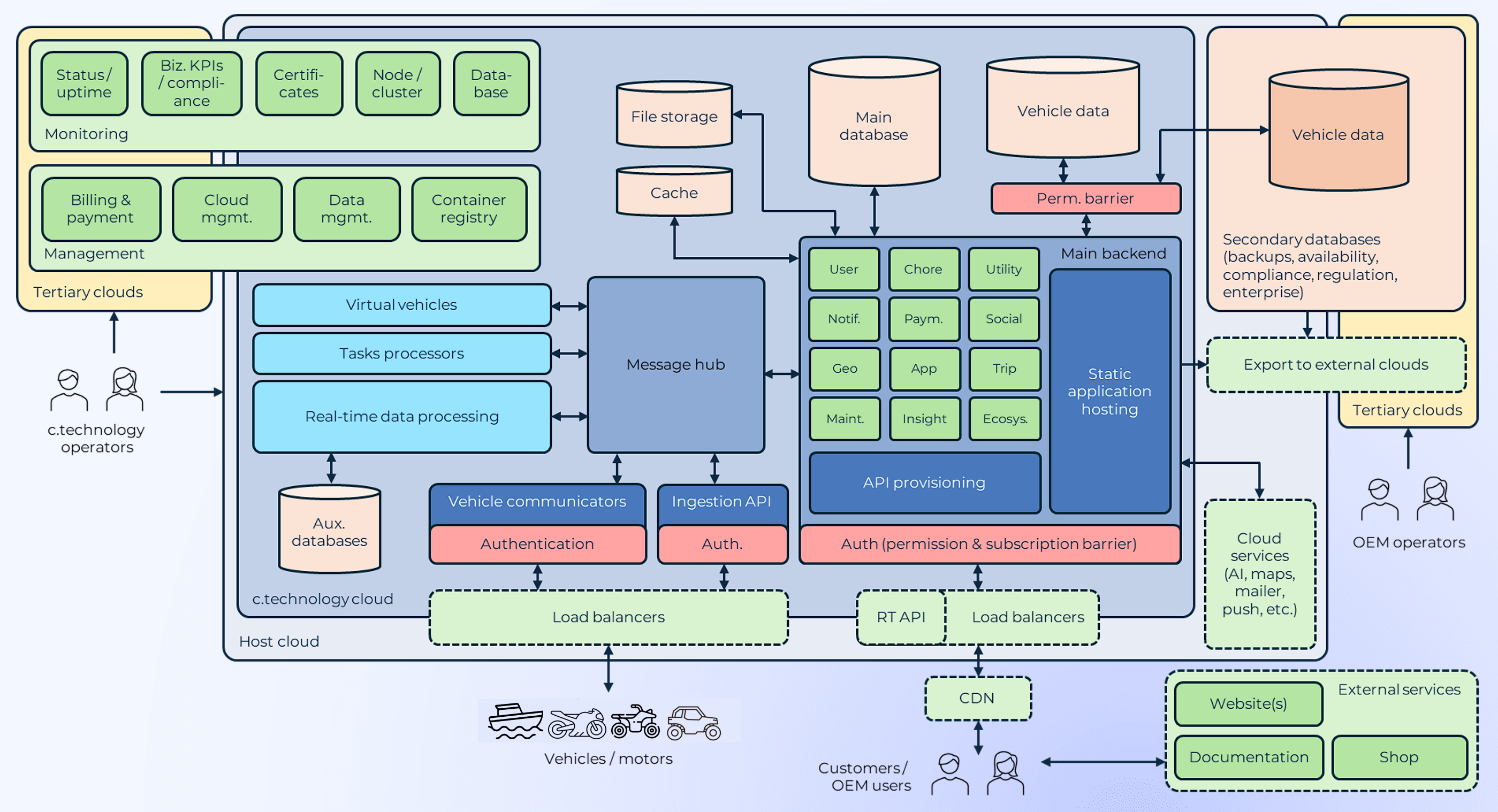 Of most interest to developers are the vehicle data ingestion points (or more generally, communication connectors), and the REST and real-time APIs that provide access to vehicle data and platform functionality.
### Vehicle communication
Vehicles connect to the platform through a variety of communication methods:
* **Telematics units**: We collaborate with a range of manufactureres whose devices are working out of the box with our platform (see the [hardware section](/hardware/introduction) for more details). Other devices can be integrated via standard protocols or by developing custom connectors (in collaboration with us).
* **Mobile apps**: Our SDKs enable mobile applications to act as intermediaries, relaying data between vehicles and the platform.
* **Cloud-to-cloud integrations, other custom setups**: Via HTTP APIs or MQTT brokers, vehicles living on existing cloud platforms can be integrated with our system.
Most commonly and quickest to start with are telematics units that support standard protocols like OBD2, NMEA2000 (marine), that have a known CAN bus specification (dbc file), or simply by using the HTTP inestion endpoints.
### REST APIs for core functionality
Our primary API follows REST conventions with a complete OpenAPI specification that enables automatic code generation and interactive documentation.
Authentication uses a token-based system, available for both personal (user email and password) and organizational accounts (API keys).
Rate limiting ensures fair usage across all clients while preventing abuse.
Generally, you will use the web interface for initial setup and configuration, as well as team and billing management, and occasional vehicle and support tasks.
You then may use the REST API for other platform operations, including:
* **Vehicle management**: Register vehicles, update configurations, and manage vehicle groups.
* **Data retrieval**: Access historical vehicle data, trip logs, and sensor readings.
* **Command and control**: Send commands to vehicles, such as locking/unlocking doors or starting/stopping engines.
### Real-Time APIs
For applications requiring immediate updates, the WebSocket-based real-time API delivers vehicle data as events occur.
This supports updates to the following data types:
* **Vehicle status updates**: Location changes, speed, fuel levels, and other telemetry data.
* **Vehicle profile updates**: Changes to vehicle configurations or user preferences.
* **Alerts and notifications**: Immediate alerts for critical events like accidents, theft attempts, or maintenance issues.
The real-time API is specified as an AsyncAPI document that details all available real-time events and their data structures.
### SDKs for building applications
From the OpenAPI and AsyncAPI specifications, a number of generators can be used to create client libraries in various programming languages.
Officially, we support a TypeScript SDK to provide a seamless integration experience for web and mobile applications.
## Getting Started
The quickest path to integration starts with authentication and basic API exploration. Once you have valid credentials, the platform opens up its full capabilities for vehicle management, real-time monitoring, and data analysis.
Another quick way to get started is by purchasing a pre-configured telematics
device from our marketplace that automatically connects to the platform. Like
this, you can start using all systems with zero setup.
### 1. Authentication Setup
Set up your account by heading to the [c.technology web app](https://app.ctechnology.io) and registering as a new user.
Reach out to [support@ctechnology.io](mailto:support@ctechnology.io) to upgrade your account to an organizational account with developer access.
In the future, self-service account upgrades will be available.
Use the authentication API to obtain an access token for subsequent API requests:
```bash theme={null}
# Get your access token
curl -X POST https://api.ctechnology.io/api/v2.2/account/login \
-H "Content-Type: application/json" \
-d '{"email": "your-email", "password": "your-password"}'
```
You will receive a response containing your access token:
```json theme={null}
{
"header": { ... },
"data": {
"token": "YOUR_TOKEN",
"expiry": "2024-12-31T23:59:59Z",
"user": { ... }
}
}
```
### 2. API Exploration
As a fist example, retrieve your user profile using the access token obtained in the previous step:
```bash theme={null}
# Test API access
curl -H "Authorization: Token YOUR_TOKEN" \
https://api.ctechnology.io/api/v2.2/me
```
If you received a response containing `"data": { "id": ..., "email": "your-email", ... }`, your authentication was successful, and you can proceed to explore other API endpoints.
### 3. OpenAPI and SDK installation
Head over to the [REST API documentation](/api-reference/introduction) to explore all available endpoints and their capabilities.
Download the OpenAPI specification to generate client code, e.g., using `openapi-generator-cli`:
```bash theme={null}
# Generate the TypeScript SDK
npx @openapitools/openapi-generator-cli generate --generator-key typescript-fetch \
-i ctechnology-openapi.json \
-o ./api-gen/ctechnology-sdk
```
### 4. Basic Integration
Integrate the generated SDK into your application to start interacting with the platform programmatically:
```typescript theme={null}
import { Configuration, UsersApi } from "./api-gen/ctechnology-sdk";
const config = new Configuration({
basePath: "https://api.ctechnology.io/api/v2.2",
apiKey: "Token your-api-key",
});
const usersApi = new UsersApi(config);
const user = await usersApi.meGet();
console.log(user);
```
## Development resources
The most important resource is the documentation you are currently reading.
If you find any gaps or have suggestions for improvement, please reach out to [support@ctechnology.io](mailto:support@ctechnology.io).
Similarly, if you want to get started with a trial immediately, or need help with integration, setup, customization, please check our offers on [ctechnology.io](https://ctechnology.io) or contact us directly.
## Next Steps
* [Organization setup](/developer/getting-started/setup-organization) - Continue with the getting started guide by learning about users and organizations
* [Platform Basics](/developer/platform-basics) - Core concepts and architecture
* [Integration Examples](/developer/integration-examples) - Real-world implementation examples
* [API Reference](/api-reference/introduction) - Complete API documentation
Of most interest to developers are the vehicle data ingestion points (or more generally, communication connectors), and the REST and real-time APIs that provide access to vehicle data and platform functionality.
### Vehicle communication
Vehicles connect to the platform through a variety of communication methods:
* **Telematics units**: We collaborate with a range of manufactureres whose devices are working out of the box with our platform (see the [hardware section](/hardware/introduction) for more details). Other devices can be integrated via standard protocols or by developing custom connectors (in collaboration with us).
* **Mobile apps**: Our SDKs enable mobile applications to act as intermediaries, relaying data between vehicles and the platform.
* **Cloud-to-cloud integrations, other custom setups**: Via HTTP APIs or MQTT brokers, vehicles living on existing cloud platforms can be integrated with our system.
Most commonly and quickest to start with are telematics units that support standard protocols like OBD2, NMEA2000 (marine), that have a known CAN bus specification (dbc file), or simply by using the HTTP inestion endpoints.
### REST APIs for core functionality
Our primary API follows REST conventions with a complete OpenAPI specification that enables automatic code generation and interactive documentation.
Authentication uses a token-based system, available for both personal (user email and password) and organizational accounts (API keys).
Rate limiting ensures fair usage across all clients while preventing abuse.
Generally, you will use the web interface for initial setup and configuration, as well as team and billing management, and occasional vehicle and support tasks.
You then may use the REST API for other platform operations, including:
* **Vehicle management**: Register vehicles, update configurations, and manage vehicle groups.
* **Data retrieval**: Access historical vehicle data, trip logs, and sensor readings.
* **Command and control**: Send commands to vehicles, such as locking/unlocking doors or starting/stopping engines.
### Real-Time APIs
For applications requiring immediate updates, the WebSocket-based real-time API delivers vehicle data as events occur.
This supports updates to the following data types:
* **Vehicle status updates**: Location changes, speed, fuel levels, and other telemetry data.
* **Vehicle profile updates**: Changes to vehicle configurations or user preferences.
* **Alerts and notifications**: Immediate alerts for critical events like accidents, theft attempts, or maintenance issues.
The real-time API is specified as an AsyncAPI document that details all available real-time events and their data structures.
### SDKs for building applications
From the OpenAPI and AsyncAPI specifications, a number of generators can be used to create client libraries in various programming languages.
Officially, we support a TypeScript SDK to provide a seamless integration experience for web and mobile applications.
## Getting Started
The quickest path to integration starts with authentication and basic API exploration. Once you have valid credentials, the platform opens up its full capabilities for vehicle management, real-time monitoring, and data analysis.
Another quick way to get started is by purchasing a pre-configured telematics
device from our marketplace that automatically connects to the platform. Like
this, you can start using all systems with zero setup.
### 1. Authentication Setup
Set up your account by heading to the [c.technology web app](https://app.ctechnology.io) and registering as a new user.
Reach out to [support@ctechnology.io](mailto:support@ctechnology.io) to upgrade your account to an organizational account with developer access.
In the future, self-service account upgrades will be available.
Use the authentication API to obtain an access token for subsequent API requests:
```bash theme={null}
# Get your access token
curl -X POST https://api.ctechnology.io/api/v2.2/account/login \
-H "Content-Type: application/json" \
-d '{"email": "your-email", "password": "your-password"}'
```
You will receive a response containing your access token:
```json theme={null}
{
"header": { ... },
"data": {
"token": "YOUR_TOKEN",
"expiry": "2024-12-31T23:59:59Z",
"user": { ... }
}
}
```
### 2. API Exploration
As a fist example, retrieve your user profile using the access token obtained in the previous step:
```bash theme={null}
# Test API access
curl -H "Authorization: Token YOUR_TOKEN" \
https://api.ctechnology.io/api/v2.2/me
```
If you received a response containing `"data": { "id": ..., "email": "your-email", ... }`, your authentication was successful, and you can proceed to explore other API endpoints.
### 3. OpenAPI and SDK installation
Head over to the [REST API documentation](/api-reference/introduction) to explore all available endpoints and their capabilities.
Download the OpenAPI specification to generate client code, e.g., using `openapi-generator-cli`:
```bash theme={null}
# Generate the TypeScript SDK
npx @openapitools/openapi-generator-cli generate --generator-key typescript-fetch \
-i ctechnology-openapi.json \
-o ./api-gen/ctechnology-sdk
```
### 4. Basic Integration
Integrate the generated SDK into your application to start interacting with the platform programmatically:
```typescript theme={null}
import { Configuration, UsersApi } from "./api-gen/ctechnology-sdk";
const config = new Configuration({
basePath: "https://api.ctechnology.io/api/v2.2",
apiKey: "Token your-api-key",
});
const usersApi = new UsersApi(config);
const user = await usersApi.meGet();
console.log(user);
```
## Development resources
The most important resource is the documentation you are currently reading.
If you find any gaps or have suggestions for improvement, please reach out to [support@ctechnology.io](mailto:support@ctechnology.io).
Similarly, if you want to get started with a trial immediately, or need help with integration, setup, customization, please check our offers on [ctechnology.io](https://ctechnology.io) or contact us directly.
## Next Steps
* [Organization setup](/developer/getting-started/setup-organization) - Continue with the getting started guide by learning about users and organizations
* [Platform Basics](/developer/platform-basics) - Core concepts and architecture
* [Integration Examples](/developer/integration-examples) - Real-world implementation examples
* [API Reference](/api-reference/introduction) - Complete API documentation